Snapisode: Short Drama & TV
- 0.0
- Rating
- 50.00K
- Installs
- Free
- Price

 Analysis by App-foxy
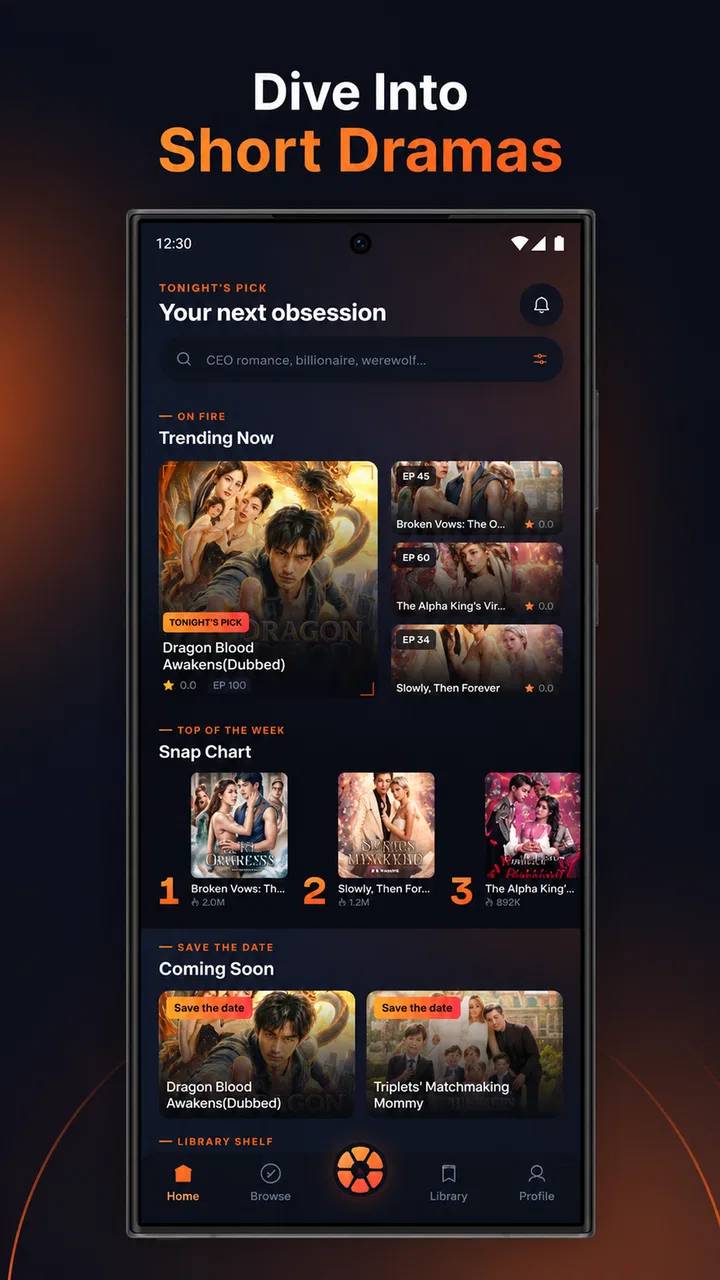
I tried Snapisode: Short Drama & TV as a quick entertainment app rather than treating it like a full television replacement, and that distinction matters. Its central idea is simple: watch vertical short dramas and series in small pieces, then move to the next episode with a swipe. The format is built for the moments when I have a few minutes, not for settling in with a long film or carefully choosing a complete season.
That makes the app immediately understandable, but it also creates a particular kind of viewing habit. Instead of browsing a large library and committing to a traditional episode, I can open a compact story, watch a short installment, and decide whether to continue almost instantly. I found that convenient during brief breaks, although the same speed can make the experience feel more like an endless stream than a deliberate television session.
How the short-drama format feels in everyday use
The vertical layout is the first thing that shapes the experience. It suits a phone held upright and keeps the action visually direct, while the swipe-to-continue design removes the pause between episodes. I did not need to return to a season page after every installment. That small change is useful when I want to follow a story while standing in a queue, waiting for a meeting, or taking a short break from another task.
You May Also Like

 Blood Strike: 2.5 Anniversary
Blood Strike’s Loadouts Turn Every Drop Into a Tactical Gamble
A close look at Blood Strike’s custom loadouts: how fast access to signature weapons reshapes its battle royale rhythm, rewards preparation, and narrows the gap between fights.

 Pandora - Music & Podcasts
Pandora’s Music Is Easy to Start, but Harder to Recover
Pandora’s strength is its low-effort path from a seed to a station. Its weak spot is how much confidence it asks you to place in connection, setup, and quiet recovery.

 8 Ball Pool
8 Ball Pool Is Built on Rivalries, Rematches, and Routine
A close look at the rivalries, rematches, shared routines, and unanswered safety questions that turn a quick pool match into a persistent mobile community.

 Samsung Music
Samsung Music’s Quiet Strength Is Playing What You Already Own
Its reach comes less from spectacle than from dependable access to a personal library. That simplicity is both the app’s strongest retention engine and its ceiling.

 AccuWeather: Weather Radar
AccuWeather Review: A Quick, Clear Forecast for Everyday Decisions
For everyday plans, the best forecast is the one you can understand quickly. AccuWeather makes rain timing, radar, and local conditions easy to act on, with a few trade-offs.

 Hill Climb Racing
Why Hill Climb Racing Still Turns Crashes Into One More Run
A tiny car, a bumpy hill and one more upgrade: Hill Climb Racing keeps resurfacing because its simple chaos makes every near-miss feel personal.
More From Our News Desk
View All News


A realistic use case is a commute with several small gaps rather than one uninterrupted journey. I could watch one episode before leaving, stop when I reached a station, and pick up the next part later without preparing a long viewing session. The format also works for people who prefer frequent, lightweight entertainment instead of a forty-minute commitment.
There is a trade-off, though. Short episodes encourage rapid continuation, so I would not open this app when I want a calm, planned evening of television. Traditional streaming services are usually better for choosing a known show, comparing seasons, adjusting the viewing plan, and watching on a larger screen. Snapisode is more appealing when convenience and momentum matter more than a broad set of viewing controls.
The swipe action is useful because it matches the way many people already consume short-form video. I could move forward without searching for a play button every time. At the same time, an interface designed around swiping can make it easy to continue automatically instead of deciding whether I genuinely want another episode. My practical advice is to treat each story as a small session and stop deliberately when the current scene gives you a natural break.
Who is likely to enjoy it
I would recommend this app to viewers who enjoy serialized romance, suspense, family conflict, or other compact dramatic stories and who regularly watch on a phone. It is especially suitable for people who dislike having to remember where they stopped in a long episode. The next installment is positioned as the natural action, so the app removes some of the friction that normally comes with returning to a series.
It may also suit someone who wants entertainment without carrying a tablet or opening a browser. The vertical presentation feels personal and immediate, and it does not ask the viewer to organize a large watchlist before starting. For a short break, that simplicity is a real strength.
I would be more cautious about recommending it to viewers who want documentaries, live programming, long-form cinema, or a carefully managed family viewing environment. A short-drama feed is a focused format, not a complete replacement for a general entertainment service. The Teen content rating is another reason parents should make their own suitability decision rather than assuming that every story is appropriate for younger children.
What the app’s identity says about trust
Snapisode is presented as an entertainment app from developer Minh Tam Nguyen, and it is free to use. Those details make trying it easy, but free access should not automatically be read as a promise of a frictionless experience. Before spending a lot of time with any free video app, I prefer to look closely at what the app asks me to do, what choices appear during setup, and whether account-related decisions are clear.
In my view, trust here comes less from the short-drama concept itself and more from the choices visible on the device. I would pay attention to whether sign-in is requested immediately, whether notifications are optional, and whether the app explains any request before I approve it. I would also avoid granting access that does not seem connected to watching vertical episodes.
The app has reached over fifty thousand installs, which suggests that it is not an entirely unknown experiment, but popularity alone does not answer privacy questions. I would still review the permission prompts and the available account controls in the version installed on my phone. The current version is 1.0.5, so I would also keep an eye on changes after updates rather than assuming that the first setup experience will remain identical.
Because the app is available at no monetary cost, the most important personal calculation is not simply whether it is affordable. It is whether the viewing convenience is worth the attention, notifications, sign-in steps, or other choices presented during use. I recommend taking a moment to read each prompt instead of tapping through setup just to reach the first episode.
Permissions, accounts, and visible choices
I cannot responsibly treat an entertainment app as trustworthy merely because its interface looks polished. My approach with Snapisode is practical: I check every permission request when it appears, decline anything unrelated to watching, and revisit the phone’s app settings if I change my mind. This gives me more control than assuming the default setup is automatically the best one.
The same principle applies to accounts. If the app allows viewing without an account, I would begin that way and only register if a specific benefit makes the extra step worthwhile. If an account is required, I would use a unique password and avoid sharing more profile information than necessary. These are small habits, but they reduce the amount of personal information tied to a casual entertainment service.
I would also inspect notification settings after installation. Episode reminders can be useful when I am following a story, but frequent alerts can turn a short-break app into a source of interruption. My preferred setup would be to keep only notifications that help me return to a series I intentionally chose, while disabling anything that feels like pressure to open the app.
Another useful check is the sign-out or account-removal path. I like to know how to leave a service before I become invested in it. If I share a phone or change devices, clear account controls matter more than a smooth first launch. A service that makes joining easy but leaving confusing deserves more caution, even if the video experience itself is enjoyable.
Data-sensitive moments during viewing
Short-video apps can collect a great deal of behavioral information simply through ordinary use: what I start, what I finish, what I skip, and how long I stay. I do not assume that Snapisode handles those signals in any particular way without a clear explanation. Instead, I treat every interaction as a reason to check the app’s visible privacy choices and the relevant system settings.
Autoplay and swipe navigation deserve special attention. They make the app feel fast, but they can also lead to more viewing than I planned. If I am using mobile data, I would be particularly careful about letting episodes continue in the background or while I am not actively watching. I would stop playback before putting the phone away and check the device’s data controls if consumption becomes a concern.
I also prefer not to use a social login for a lightweight viewing service unless I understand exactly what information the connection shares. A separate account can be easier to isolate from other services, while a social login may be convenient but ties the viewing profile to a broader identity. The better choice depends on the options shown during setup, so I would make that decision deliberately rather than selecting the fastest button.
When an app offers personalized recommendations, I consider whether the convenience justifies the amount of viewing history involved. With Snapisode, the short-episode format makes recommendations especially influential because the next swipe is always close at hand. I would periodically review what I am watching and clear or reset choices where the app and device make that possible, particularly if another person occasionally uses my phone.
Practical ways to keep control of the experience
My first tip is to create a stopping rule before opening the app. For example, I might watch during a coffee break and stop after the current episode rather than swiping automatically. This sounds basic, but it is more important in a format built around instant continuation. The app’s convenience is strongest when I use it for a defined gap, not when it quietly expands into the rest of the evening.
My second tip is to separate discovery from commitment. I would sample a story while I have time to decide, then avoid subscribing, signing in, or enabling reminders until I know that the writing and pacing suit me. Short episodes can make a weak premise feel exciting for a few minutes, but a longer run may not hold the same interest. Giving myself a short trial prevents the swipe mechanic from making the decision for me.
My third tip is to use the phone’s own controls as part of the viewing setup. I would check battery usage, mobile-data access, notification permissions, and screen-time tools after a few sessions. These controls are useful because they remain available even if the app’s internal settings are limited or arranged differently after an update.
A fourth consideration is the viewing environment. Vertical drama is comfortable in one hand, but it is not ideal for sharing with friends across a room. If I wanted a group movie night, a conventional streaming app with television support would be a better choice. Snapisode works best as an individual, phone-first experience where the short format is an advantage rather than a compromise.
How it compares with familiar entertainment options
Compared with a general streaming service, Snapisode is quicker to enter and easier to use in fragments. I do not need to reserve a long block of time, and the next episode is only a swipe away. The disadvantage is that the format may offer less control over how I plan a viewing session. A traditional service is usually better when I already know what I want to watch or when I want to manage a substantial library.
Compared with ordinary social-video feeds, the app’s drama focus can make the viewing experience feel more coherent. Instead of jumping between unrelated clips, I can follow a continuing story. However, the swipe behavior still carries the same risk of losing track of time. If my main goal is random comedy, news clips, or creator content, a broader short-video platform may offer more variety.
Compared with free television-style apps, Snapisode’s strongest distinction is the compact serialized structure rather than a promise of broad programming. I would choose it for short dramatic arcs and choose another service for live channels, familiar full-length shows, or a larger range of genres. The right option depends on whether I value story continuity in small pieces or programming breadth.
Performance expectations and the limits of the concept
The minimum operating-system requirement is Android 7.0, which makes the app accessible to many older Android phones. That is helpful for people who keep a dependable device rather than upgrading frequently. Still, compatibility does not guarantee identical performance on every handset. Vertical video, repeated loading, and continuous swiping can feel different depending on the phone, connection, storage, and battery condition.
I would test it first on the network I normally use, not only on fast home Wi-Fi. A short-drama app is most useful when it works during the small gaps where I actually need it, such as a commute or a waiting room. If episodes pause often or the phone becomes uncomfortable to hold for extended viewing, the convenience advantage becomes much smaller.
The Teen rating also affects where I would use it and who I would hand the phone to. I would not assume that a vertical, casual-looking presentation means child-oriented material. Parents should inspect the app themselves and use the device’s existing supervision tools where appropriate.
Another limitation is emotional pacing. Short episodes often rely on quick hooks and cliffhangers, which can be entertaining but may feel repetitive to viewers who prefer subtle character development. I enjoy that rhythm in small doses, yet I would switch to a conventional series when I want richer scenes, slower tension, or a story that gives each moment more room.
My verdict after weighing convenience against control
Snapisode is a focused entertainment app for people who want serialized drama in brief, phone-friendly pieces. I like the direct swipe-to-next-episode flow because it removes unnecessary navigation, and the format fits real-life pauses better than a traditional television episode. The free price makes experimentation straightforward, while the Teen rating gives viewers an important reminder to consider suitability rather than judging the content by its simple interface.
My recommendation comes with conditions. I would install it for short dramatic viewing, but I would review permissions, notification choices, account requirements, and device data settings before settling into regular use. I would also set my own stopping point, because the same automatic momentum that makes the app enjoyable can make it surprisingly easy to watch longer than planned.
For someone who wants long-form television, live programming, shared-screen viewing, or a carefully organized library, another entertainment service will probably be a better match. For someone who wants a continuing story during scattered moments of the day, this app has a clear purpose and delivers a more convenient route than opening a full streaming catalog.
My cautious verdict: I would recommend giving Snapisode a measured try if short vertical dramas genuinely appeal to you. Use it with deliberate account and permission choices, keep an eye on notifications and data use, and judge the stories rather than the swipe mechanic alone. That approach lets the app remain what it does best: a compact source of episodic entertainment, not an all-purpose replacement for every way of watching television.
FAQs for Snapisode: Short Drama & TV
01What is Snapisode: Short Drama & TV?
Snapisode: Short Drama & TV is a mobile streaming app focused on short-form dramatic series and episodic television-style stories. Episodes are designed for quick viewing, making the app suitable for users who prefer romance, suspense, family conflict, and other serialized plots without committing to a full-length movie or traditional television episode. The available catalog and featured titles may change regularly.
02Is Snapisode: Short Drama & TV free to download and use?
The app can generally be downloaded without an upfront purchase, but access to all content may depend on the platform’s monetization system. Some episodes or features may be available for free, while other content can require advertisements, virtual coins, subscriptions, or in-app purchases. Before watching extensively, check the pricing details shown in the app store and inside the application, since offers and access rules may vary by region.
03Does Snapisode require an internet connection?
Yes, Snapisode is primarily a streaming application, so a stable internet connection is normally required to browse the catalog and play episodes. Wi-Fi is recommended for longer viewing sessions because mobile streaming can consume a considerable amount of data. Whether episodes can be downloaded for offline viewing depends on the current version of the app and the rights associated with each title, so users should not assume offline access is available.
04What type of content can I watch on Snapisode?
The app is aimed at viewers who enjoy short, serialized dramas with frequent cliffhangers and quickly developing storylines. Its programming may include romantic relationships, secrets, revenge plots, family disputes, and suspenseful situations. Because the catalog can include mature themes or emotionally intense scenes, parents should review the app’s age rating and supervise younger viewers. Content availability, language options, subtitles, and regional access may differ.
05Is Snapisode: Short Drama & TV safe to install?
Snapisode should be downloaded from the official Google Play Store or Apple App Store rather than from unofficial websites or modified APK sources. Before installing, review the developer information, permissions, privacy policy, age rating, and recent user feedback. As with any streaming app, it may collect certain account, device, usage, or payment information. Avoid sharing unnecessary personal details and carefully confirm any subscription or in-app purchase before completing it.
Pros
- Short episodes fit easily into commutes and quick breaks.
- Vertical video is optimized for comfortable one-handed viewing.
- Frequent story updates can keep regular viewers engaged.
- Simple browsing makes it easy to discover new dramas.
- Dramatic cliffhangers encourage viewers to continue watching.
Cons
- Many episodes may require coins
- subscriptions
- or in-app purchases.
- The short format can make character development feel rushed.
- Content availability may vary by region and device.
- Frequent ads can interrupt viewing for non-paying users.
- Video streaming can use substantial mobile data.

Snapisode: Short Drama & TV
Gallery